Dance formation maker with a 3D preview
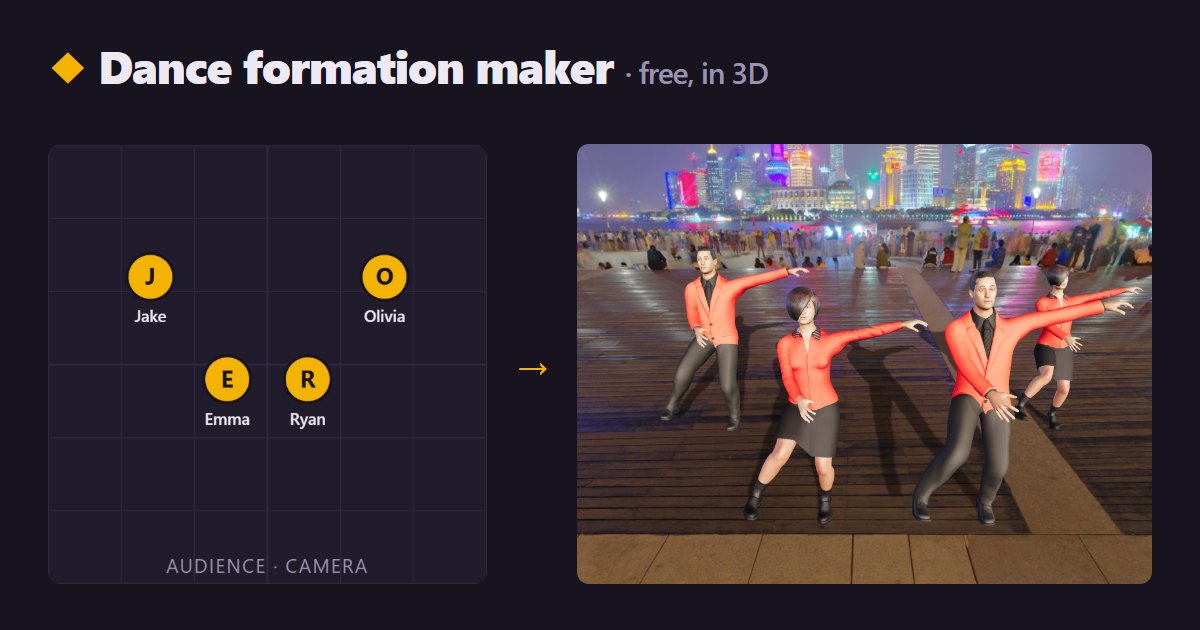
Squad Dance is a free dance formation maker that runs in your browser. Drag each dancer on a top-down stage map, choose the beat where the formation changes, and watch the squad walk into place while they dance in 3D. No download or account is needed.
How to plan formations
- Choose a routine. Pick a dance preset or keep the demo squad. Add or remove dancers in the Squad tab.
- Set the opening formation. In the Scene tab, start from a line, V, two rows or arc, and adjust the spacing.
- Add a formation change. Move the playhead to the count where the squad should be somewhere new and press “Add formation”. The ruler shows bars of four beats.
- Place every dancer. Drag the dots on the stage map. The bottom edge is the audience and camera. Use Line, V, 2 rows, Arc or Mirror as a starting point.
- Time the walk. Choose how many beats the dancers take to travel, from 0 (a jump cut) to 8 beats, then press “Play the change”.
- Share it. Watch from the front, orbiting or low camera and export a vertical video for your team, or save the project file.
What the formation maker does
| Stage map | Top-down grid in metres, snapping every 5 cm, with the audience at the bottom |
|---|---|
| Formation changes | As many as you need, each on its own beat, marked on the timeline ruler |
| Transitions | Dancers walk in a straight line over 0 to 8 beats and hold until the next change |
| Preview | 3D characters perform the routine while they travel; switch camera or explore the stage |
| Export | Portrait 1080×1920 or 720×1280 video, made on your device |
| Price | Free, without an account; sign in only to save projects in the cloud |
Formation ideas by group size
| 3 dancers | Triangle with the lead in front, a straight line, or a diagonal from back left to front right |
|---|---|
| 4 dancers | Two staggered rows of two, a diamond, or a shallow V opening to the audience |
| 5 dancers | V or arrow, three in front with two in the gaps behind, or an arc |
| 6 dancers | Two rows of three in windows, a 1-2-3 pyramid, or two groups of three facing each other |
| 8 dancers | Two rows of four in windows, a wide V, or two diamonds side by side |
“Windows” means the back row stands in the gaps of the front row, so the audience can see everyone.
Tips for clean formation changes
- Change formation at the start of a phrase, usually count 1 of an eight-count.
- Give long journeys more beats, and keep paths from crossing where you can.
- Keep spacing even so the shape reads from the audience.
- Check the low camera: it shows who gets hidden behind whom.
Current limits
Dancers travel in straight lines, so curved paths need two formation changes. Formations are saved with the routine; loading a different dance preset starts a fresh set. There is no live collaboration yet: share the exported video or the project file.
Questions
Does it work on a phone?
Yes. The stage map works with touch, and the Scene tab is in the bottom bar. A laptop is more comfortable for big groups.
Can I use my own 3D characters?
Yes. Import a rigged humanoid GLB in the Squad tab. The GLB character guide explains which rigs work.
Can I make the dancers do different moves?
Yes. The timeline has a lane for the whole squad and one for each dancer. The first-video guide covers the editor.